

You are using an out of date browser. It may not display this or other websites correctly.
You should upgrade or use an alternative browser.
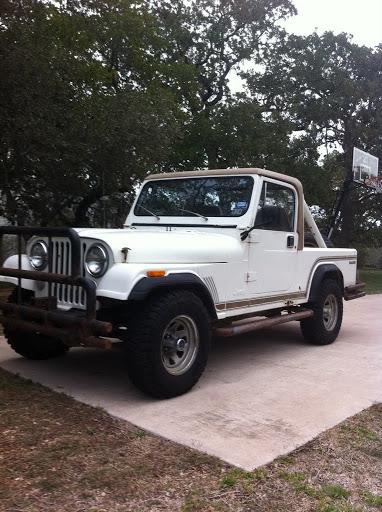
85 jeep
- Thread starter big_o_
- Start date

- City
- Rock Hill
- State
- SC
Looks great when I look at it sideways. 


- City
- Cincinnati
- State
- Oh
Looks great when I look at it sideways.
He musta done the brake upgrade.
The rest of it looks good too.


PetesCj-8
CJ-8 Member
- City
- slatington
- State
- pa
Looks great when I look at it sideways.
Like it , but my neck hurts.
 Everyone remember when you first started posting pics.


 Watch out deer!!!
- City
- Cincinnati
- State
- Oh
Yeah. We're all just kiddin'. More pics and specs, please.

- City
- Cincinnati
- State
- Oh
He musta done the brake upgrade.
The rest of it looks good too.
LOL on the brakes.


I think I have to call that a rocker guard/rock slider and not a nerf bar, it must be 3" steel.
Looks like a nice scrambler. They are a blast to drive. Welcome.
Rotated and embedded Pic if anyone else got vertigo.

- City
- Ashburn
- State
- VA
When you are using a website like photobucket to host photos you can just click the pic on that site a copy the image option to get a link with the IMG tags. Then just paste the link into your reply.
Also in Tapatalk in the window where you are typing is a bar at the bottom that says Open Advanced Options. You will see where you can upload a photo. Good luck.