


- City
- Redmond
- State
- OR
I've been looking at different wheels for my build, and have tried numerous wheel visualizers to see how they will look. There are several that will allow you to download a picture of your Scrambler and "try on" wheels. Some pics work better than others, usually one with the front wheel turned. You'll see what I mean if you try it. Here's a link-
https://www.customwheelsnc.com/wheel-visualizer
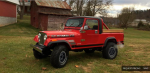
And a sample-
But what if you don't have a picture of your Scrambler built? Or what if you want to see it in a different color? Or what if you'd like to try on a 2" lift? I stumbled upon one that offers those options. Link:
https://www.bigotires.com/wheel-visualizer
Here's what you get there-
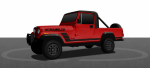
Both of these pictures show wheels I was considering. I ended up choosing the ones in the first picture. Actually, the first picture is a pretty good approximation of what I'm going for in my build. Just with body colored hinges and grille, black mirrors and door handles, and probably no stripes. I like the looks of the stripes pictured but they aren't year-correct for my 81. (Like that matters with all the other mods I'm doing.)
Ok- go have some fun and waste a few hours like I did.
https://www.customwheelsnc.com/wheel-visualizer
And a sample-
But what if you don't have a picture of your Scrambler built? Or what if you want to see it in a different color? Or what if you'd like to try on a 2" lift? I stumbled upon one that offers those options. Link:
https://www.bigotires.com/wheel-visualizer
Here's what you get there-
Both of these pictures show wheels I was considering. I ended up choosing the ones in the first picture. Actually, the first picture is a pretty good approximation of what I'm going for in my build. Just with body colored hinges and grille, black mirrors and door handles, and probably no stripes. I like the looks of the stripes pictured but they aren't year-correct for my 81. (Like that matters with all the other mods I'm doing.)
Ok- go have some fun and waste a few hours like I did.
Last edited: